Weather Forecast & Widget
- 4.7
- Rating
- 1.00M
- Installs
- Free
- Price
 Analysis by App-foxy
I tend to judge a weather app less by its screenshots than by what happens when I need an answer quickly. Weather Forecast & Widget is built for that everyday moment: checking the conditions before leaving home, comparing the next few hours, or deciding whether a plan needs a backup. It is a free weather app for Android, developed by Weather Forecast & Useful Weather Widgets & Radar, and its focus is straightforward rather than adventurous.
After spending time with it, I found the main appeal to be the combination of local information, hourly planning, daily outlooks, and a widget-oriented approach. The app is not trying to replace a specialist meteorological tool for severe-weather analysis. Instead, it aims to make routine weather checks easy to repeat throughout the day. That distinction matters, because the best choice depends on whether you want a quick forecast at a glance or a deeper set of professional maps and alerts.
Where the first useful forecast can become confusing
The first point where I would expect some users to hesitate is location setup. A weather app needs a useful place before its forecast can feel personal, and the experience depends on choosing the correct location rather than simply accepting the first result that looks familiar. This is especially important for people living near towns with similar names, commuters who regularly cross city boundaries, or anyone who wants a forecast for a destination rather than their current position.
You May Also Like

 Blood Strike: 2.5 Anniversary
Blood Strike’s Loadouts Turn Every Drop Into a Tactical Gamble
A close look at Blood Strike’s custom loadouts: how fast access to signature weapons reshapes its battle royale rhythm, rewards preparation, and narrows the gap between fights.

 Pandora - Music & Podcasts
Pandora’s Music Is Easy to Start, but Harder to Recover
Pandora’s strength is its low-effort path from a seed to a station. Its weak spot is how much confidence it asks you to place in connection, setup, and quiet recovery.

 8 Ball Pool
 Is Built on Rivalries, Rematches, and Routine
A close look at the rivalries, rematches, shared routines, and unanswered safety questions that turn a quick pool match into a persistent mobile community.

 Samsung Music
’s Quiet Strength Is Playing What You Already Own
Its reach comes less from spectacle than from dependable access to a personal library. That simplicity is both the app’s strongest retention engine and its ceiling.

 AccuWeather: Weather Radar
AccuWeather Review: A Quick, Clear Forecast for Everyday Decisions
For everyday plans, the best forecast is the one you can understand quickly. AccuWeather makes rain timing, radar, and local conditions easy to act on, with a few trade-offs.

 Hill Climb Racing
Why Hill Climb Racing Still Turns Crashes Into One More Run
A tiny car, a bumpy hill and one more upgrade: Hill Climb Racing keeps resurfacing because its simple chaos makes every near-miss feel personal.
More From Our News Desk



My practical advice is to pause during the initial location step and check the complete place name before continuing. A forecast can look perfectly believable while still belonging to the wrong town. If the conditions seem strangely different from what you see outside, the location is the first thing I would verify, not the forecast itself.
The second common sticking point is understanding the difference between the app and its widget. The app is where I would go for a fuller look at the local forecast, while the widget is intended to reduce the number of taps needed for routine checks. A widget can be convenient, but it is also more dependent on the phone’s home-screen behavior, refresh handling, and available space. If the app works but the widget does not look current, that does not automatically mean the forecast service is broken.
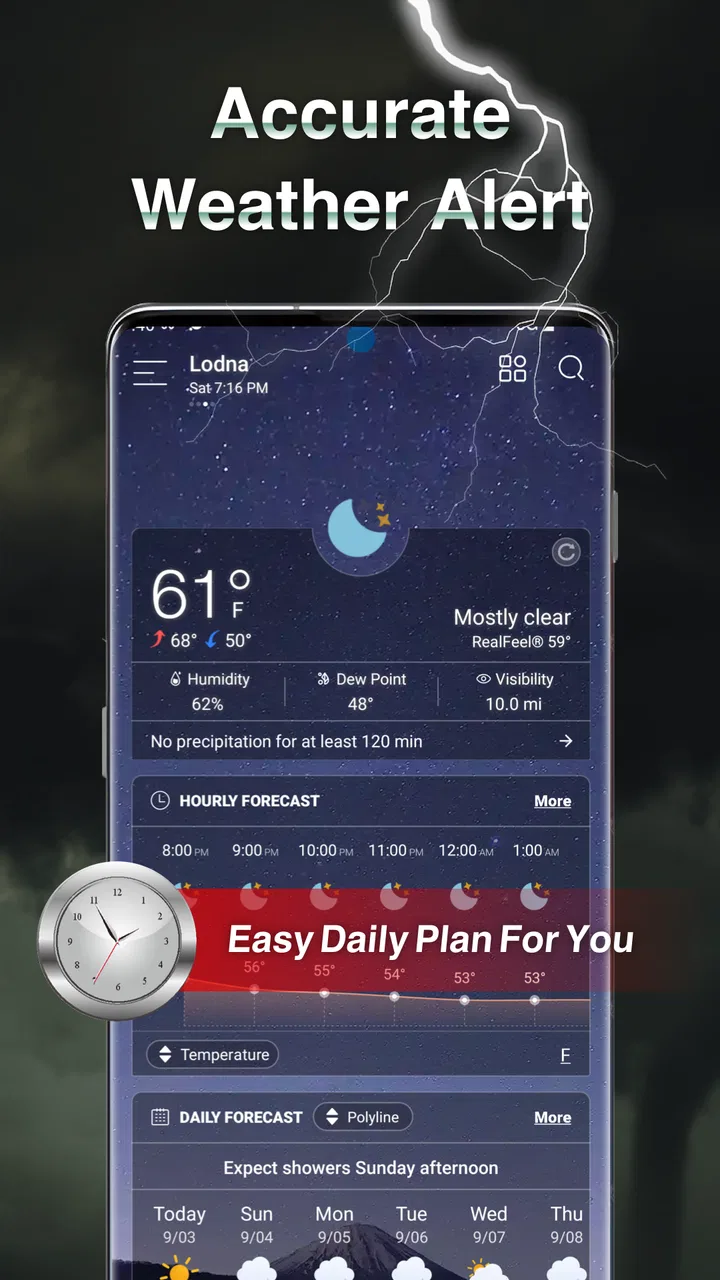
I also noticed that weather information is easiest to use when I treat it as a planning aid rather than a promise. Hourly forecasts are useful for choosing a departure time, but weather can change between checks. Daily summaries are better for seeing the general shape of the day. Mixing those two views without considering their different purposes can make the app feel less consistent than it really is.
The app has earned a 4.7 average from around 49 thousand ratings, with roughly 900 written reviews and over 1 million installs. Those figures suggest that it has found a broad audience, but they do not remove the need to set it up carefully. A popular weather app can still show an unhelpful result when the wrong location, an outdated widget, or a phone-level restriction gets in the way.
What I check before blaming the forecast
When a weather app appears to be showing old information, I use a simple sequence. I first open the main app instead of relying only on the widget. Then I check whether the selected place is the one I actually want. Finally, I compare the hourly and daily views to see whether the issue is a stale display or simply a forecast that has changed.
This workflow is useful because it separates three different problems. A wrong location is a setup issue. A widget that has not refreshed is a home-screen issue. A forecast that differs from yesterday is normal weather uncertainty. Treating all three as the same problem usually leads to unnecessary reinstalling or repeated changes that do not address the real cause.
Setting up Weather Forecast & Widget for everyday use
On Android, the app supports devices running Android 8.0 or later. That gives it a reasonably broad reach, although older phones may behave differently depending on their manufacturer’s background activity rules. I would install it, choose a familiar location, and spend a minute learning the main forecast screens before adding anything to the home screen. That order makes troubleshooting much easier later.
The current version is 1.2.61, and the app is free to install. There are in-app purchases ranging from $1.99 to $4.99 per item, so I would pay attention to any optional upgrade screen and decide whether the free experience already covers the way I plan to use it. For a basic forecast check, I would not assume that paying is necessary. The sensible approach is to use the free version first and only consider an optional purchase if it solves a specific annoyance.
Because the content rating is Everyone, the app is positioned for general household use rather than a narrowly defined audience. I can see it fitting a family tablet, a personal phone, or a device used by someone who wants a simple weather reference without learning a technical interface. That simplicity is helpful, but it also means users looking for advanced meteorological interpretation may find the presentation less satisfying than a specialist service.
Once the location is correct, I would add the widget only after confirming that the in-app forecast is behaving as expected. On a crowded home screen, a weather widget can become visually compressed, making important details harder to read. Moving it to a less crowded page or choosing a size that leaves enough room for the information is a small adjustment with a noticeable effect. I would also avoid judging the widget immediately after placing it; give the phone a moment to complete its first update.
One useful habit is to use the widget for quick decisions and the app for deliberate planning. Before walking the dog, I might glance at the home screen. Before a long drive, outdoor event, or work shift, I would open the app and inspect the hourly pattern instead of relying on a single compact display. This division keeps the widget convenient without asking it to carry more information than its format can comfortably show.
A realistic morning routine
Imagine I am leaving for work and have a short walk to a bus stop. I check the widget first to see whether the immediate conditions look reasonable. If the next few hours appear unsettled, I open the app and look at the hourly forecast around the time I expect to leave and return. That gives me a better basis for deciding whether to carry a rain jacket than a quick glance at the day’s general label.
Later, if my schedule changes, I repeat the check rather than relying on the morning view. This is one of the stronger ways to use the app: not as a once-a-day decoration, but as a lightweight planning tool. The daily forecast helps me understand the broader outlook, while the hourly view supports a decision tied to a specific part of the day.
There is also a useful trade-off here. Frequent checking can improve practical decisions, but it can also encourage overconfidence in small changes. I would use the app to choose between reasonable options, such as taking a coat or moving an outdoor task, rather than treating a narrow forecast window as certainty.
Recovering when the workflow breaks
If the home-screen widget looks frozen, my first recovery step would be to open the main app. If the in-app information is current, I would remove and add the widget again, then check whether the phone’s home screen is displaying the correct location. This is a safer first response than immediately deleting the app, because it tests whether the problem is limited to the widget itself.
If the main app also appears wrong, I would recheck the selected place and reopen the relevant forecast view. I would then compare the daily and hourly sections. A mismatch between what I expected and what the app shows may be a normal update in the forecast rather than a technical failure. Rechecking after a short interval can clarify whether the display is changing normally.
For phones that aggressively limit background activity, widget updates may be less dependable than opening the app manually. I would look through the device’s own battery and background-activity settings, using the manufacturer’s standard controls rather than installing extra tools. The exact menus vary by phone, so the safe general lesson is simply to make sure the app is not being prevented from refreshing.
Another practical check is the phone’s internet connection. If other apps are also struggling to update, the weather app is unlikely to be the only cause. Switching between the available connection methods, when appropriate, can reveal whether the issue is local to the network. I would avoid drawing conclusions from one failed refresh while the device itself is offline or unstable.
When the app is not the cause
Weather forecasts are inherently changeable, and a forecast becoming different from an earlier check is not proof of a malfunction. The most useful question is whether the app is showing a coherent current view for the correct location. If the hourly outlook has changed but the app opens normally and the location is right, I would interpret that as updated information rather than an error.
Local conditions can also vary sharply over short distances. A forecast for a nearby city may not match a hill, coastline, valley, or rural area. If I live close to a boundary between places, I would test the available location choices and select the one that best represents where I spend time. The app cannot make a general city forecast behave like a private weather station in my garden.
Phone settings can create misleading symptoms too. A widget can disappear after a home-screen change, become hard to read after resizing, or appear outdated while the app itself is current. These are frustrating, but they point toward the phone’s launcher or refresh behavior rather than the forecast content. Keeping that distinction in mind saves time and prevents unnecessary changes to a working installation.
I would also be cautious about using this app as the only source for high-consequence decisions. For ordinary commuting, errands, clothing choices, and casual outdoor plans, it is a sensible convenience. For dangerous conditions, aviation, marine activity, emergency preparation, or work that depends on precise warnings, I would consult the relevant official or specialist source as well. A clean interface does not turn a general weather app into a professional safety system.
Where it fits among other weather choices
Compared with checking a search engine for a single temperature, Weather Forecast & Widget is more useful when I want to return to the same location throughout the day. The widget reduces friction, and the combination of hourly and daily views gives me more planning context than a one-line result. It is a better fit for repeated personal use than for a single isolated query.
Compared with a weather service built around radar layers, storm tracking, or detailed warning maps, this app feels more approachable and less specialized. That is a strength for someone who wants everyday information without a steep learning curve. It is a weakness for users who want to watch a storm cell develop or inspect technical atmospheric details.
Compared with a manufacturer’s built-in weather tool, the main reason to try this app is the dedicated focus on forecast views and widgets. Whether it feels like an improvement will depend on the phone. If the built-in option already gives the exact location handling, layout, and update behavior I want, changing may not be worthwhile. If I want a different presentation or a more deliberate hourly-and-daily workflow, this app is easier to justify.
Its free entry point also makes experimentation straightforward, although the presence of optional purchases means I would still review the upgrade choices rather than tapping through automatically. Users who dislike any in-app purchase prompts may prefer a simpler tool with fewer monetization decisions. Users who are comfortable trying the free version first have little reason not to evaluate it on their own routine.
Who should use it, and who should skip it
I would recommend it to someone who wants a clear local forecast, checks conditions several times a day, and likes the convenience of a home-screen widget. It is particularly suitable for commuters, parents organizing outdoor plans, dog owners, casual walkers, and anyone who wants hourly context without opening a complex weather dashboard every time.
I would be less enthusiastic for a user whose main requirement is specialist radar analysis, detailed severe-weather monitoring, or highly technical data. In those cases, a dedicated service built around maps and alerts may be the better choice. I would also hesitate to recommend it to someone who never uses widgets and only wants a one-off temperature lookup, because the app’s broader workflow may offer little advantage over a quick web search or built-in tool.
People with older or heavily customized Android phones should also set expectations sensibly. The app supports Android 8.0 and newer, but the phone’s own handling of widgets and background activity can still affect convenience. If the main forecast works while the widget is unreliable, the problem may be the device environment rather than the app’s core purpose.
For me, the most important strength is not a flashy feature but the way the app supports a repeatable routine: glance at the widget, open the hourly view when timing matters, and use the daily outlook for broader planning. The most important limitation is that this convenience can be mistaken for precision. I get the best results when I use the app as an informed guide and keep specialist or official sources available for situations where the stakes are higher.
My practical verdict is that Weather Forecast & Widget is worth trying if you want a free, approachable weather companion rather than a professional forecasting workstation. I like its focus on local checks, hourly planning, daily context, and quick home-screen access. Setup deserves a little care, especially around location selection and widget behavior, but those checks prevent most avoidable frustration.
The app was released on Jul 12, 2021, and its continued presence alongside a current version of 1.2.61 gives it the feel of an established everyday option rather than a brand-new experiment. I would install it, confirm the location, test the main forecast before adding the widget, and use the free experience for several normal days. If it matches the way I plan my mornings and evenings, the optional purchases can be considered later; if I need specialist warnings or radar detail, I would move to a more focused weather service instead.
In short, Weather Forecast & Widget works best when convenience is the goal. It helps turn weather checking into a quick, repeatable habit, while still giving enough hourly and daily context for ordinary decisions. It is not the right tool for every weather question, but for everyday Android use, I find that balance practical and easy to live with.
FAQs for Weather Forecast & Widget
01What is Weather Forecast & Widget, and what does it offer?
Weather Forecast & Widget is a mobile weather application designed to provide current conditions, hourly updates, and extended forecasts in a convenient format. During testing, its main appeal was the combination of detailed weather information and customizable home-screen widgets. Depending on the device and available services, users may also see temperature, precipitation chances, wind, humidity, sunrise and sunset times, and severe-weather notifications.
02How accurate are the forecasts in Weather Forecast & Widget?
Forecast accuracy depends on the weather data provider, your location, and how quickly conditions change. The app generally provides useful short-term information, especially for temperature and precipitation trends, but no weather application can guarantee perfect predictions. Users should treat severe-weather warnings seriously and compare important alerts with official local meteorological services, particularly during storms or rapidly changing conditions.
03Does Weather Forecast & Widget require location access?
The application can usually use your location to automatically display local weather, but location access is not always essential. You may be able to search for and save a city manually instead. Allowing location access makes the app more convenient when traveling, although users concerned about privacy can choose approximate location permissions or disable access and manage locations themselves through the app’s settings.
04Can I customize the weather widget and notifications?
Customization options may vary according to the version of the app, your operating system, and the widget selected. In general, users can choose different widget sizes and layouts, while some versions allow changes to displayed information, refresh behavior, colors, or measurement units. Notifications can often be enabled for weather changes or warnings, but unnecessary alerts may be disabled from the app or device settings.
05Is Weather Forecast & Widget free to download, and are there advertisements?
Weather Forecast & Widget may be available as a free download, but the exact business model can differ between Android and iOS versions. Free editions may include advertisements, optional purchases, premium features, or subscription-based tools such as additional widgets and extended forecast details. Before installing, check the relevant app-store listing for current pricing, in-app purchases, privacy information, and supported devices.
Pros
- Accurate forecasts with hourly and daily weather details
- Customizable widgets provide quick updates from the home screen
- Supports multiple locations for travel and family monitoring
- Clear interface makes weather information easy to understand
- Useful alerts help users prepare for severe weather conditions
Cons
- Some advanced features may require a premium subscription
- Advertising can be distracting in the free version
- Forecast accuracy may vary depending on your location
- Widgets may use additional battery when updating frequently
- The app may request location access for automatic updates

Weather Forecast & Widget
Gallery